








"Astalty rescued Hype from admin overload"
Rostering With No Stress
Get visibility on gaps, clashes, and availability before they disrupt your team.
Instant Availability Updates
Get notified the moment Support Workers submit availability changes or time-off requests, keeping your roster current.
Clash Detection Built In
Spot scheduling conflicts early with automated reports to flag issues before it impacts Participants or service delivery.
Future-Proof Your Schedule
Plan supports weeks ahead with accurate availability data, eliminating last-minute scrambles and reactive rostering.
Crystal-Clear Visibility
A clean dashboard highlights gaps and conflicts instantly, making critical rostering issues impossible to miss.

Day-to-Day Oversight
Stay on top of shifts and keep your roster running smoothly.
Unassigned Shifts
See gaps instantly with clear visual indicators, ensuring no shift goes unfilled or gets overlooked.
Shift Approvals
Review and approve worker shifts quickly with all the context you need to make confident decisions.
Availability Requests
Action all availability changes and time-off requests from a single, centralized view without switching screens.
At-a-Glance Dashboard
Know exactly what needs your attention today with a prioritized overview of pending actions and alerts.

Smarter Scheduling
A calendar built for NDIS providers, simple to use, powerful in practice.
Availability Matching
Instantly see which Support Workers are free and assign the right person to each shift without the guesswork.
Preferences Built-In
Match Participants with their preferred workers automatically, improving service quality and strengthening trusted relationships.
Flexible Views
Toggle between daily or weekly layouts and switch seamlessly between Participant-focused or Worker-focused perspectives.
Easy to use
Adjust shifts, reassign workers, and fill gaps with intuitive controls that make complex scheduling feel effortless.

All the Right Information
Give Support Workers the clarity they need to deliver quality support, every time.
Goals in View
Share NDIS goals directly with staff for every shift, keeping outcomes front and centre.
Essential Details Upfront
Provide key information like pickup locations, tasks, and preferences at a glance before supports begin.
Centralized Documentation
Attach reports, instructions, and important files to each Participant's profile for easy staff access.
Compliant Meal Breaks
Build in meal breaks automatically to meet Award requirements and maintain proper rest periods.

Travel & Charges
Take the hassle out of travel and billing with simple, flexible tools.
Flexible Travel Setup
Configure travel time before, during, and after supports with intuitive controls that adapt to any service scenario.
Automatic Charge Application
Apply charges based on time of day or distance traveled, eliminating manual calculations and reducing billing errors.
Custom Billing Items
Add one-off charges or specialized billing items alongside scheduled supports whenever your services require flexibility.
Direct Funding Links
Every charge connects to the correct funding source, ensuring transparent tracking and accurate budget reporting.

How It Works
From roster to delivered support in three steps
Build your roster
Use availability matching and preference settings to assign the right workers to each shift. The system flags any clashes or gaps automatically.
Workers get notified
Your team receives instant roster updates via the Support Worker App, complete with all shift details, Participant goals, and essential information.
Track and approve
Workers clock in/out with GPS verification and log travel. You approve shifts with full visibility on times, locations, and charges before they flow to payroll.
Complete Solution
Works With Your Whole Workflow
Rostering is just the start. See how Direct Supports connect with the rest of your operations.
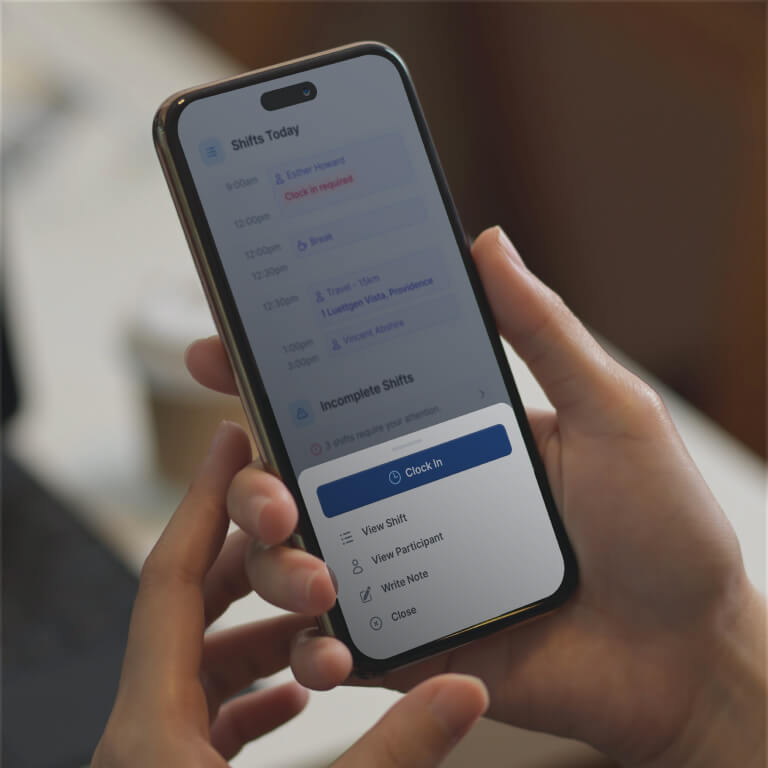
Support Worker App
Give your team the tools to stay organized on the go. From clocking in and adding notes to receiving instant roster updates.

Groups Made Easy
Manage group activities with clear rosters, attendance tracking, and ratio management all in one place.

Connected Workflows
Rostered shifts flow directly into timesheets, invoicing, and payroll, no double-entry, no disconnected systems.
Don't just take our word for it
See the Astalty Difference
4.9 out of 5.0
Trusted by 2,000+ NDIS businesses

"Onboarding with Astalty was easy, probably the easiest I've ever experienced, and I've experienced a few."
"Invoicing quite literally takes 30 minutes. With the old software, I was trying to fit a round peg into a square hole. With Astalty, that just isn't the case."
"Incredible, what can I say? Where do I start? This platform has completely changed the way we run. Astalty has streamlined everything."

Natalie Tobin
"Astalty is incredibly easy to use and probably the best platform for Support Coordinators as everything is built around tasks."

Andrew McCully
Questions
Frequently Asked Questions
Still have questions? Chat with our team.
Ready to Transform Your NDIS Business?
Join 2,000+ providers who've automated their operations and improved participant outcomes.
Setup in 2-3 weeks
90-day money-back guarantee
Free training
No lock-in contracts